
Side Work Memory · macOS 메뉴바 앱
Mac에서 읽은 내용을
출처와 함께 다시 찾으세요.
Side는 브라우저와 Mac 앱의 활성 창에서 읽을 수 있는 내용을 기기에 기록합니다. 기록을 검색하고, 요약 제공자를 설정해 전송에 동의하면 날짜별 요약도 확인할 수 있습니다. 연결한 에이전트에서도 기록을 검색할 수 있습니다.
개발 중 · macOS 14+ · 사전 빌드 앱 미제공
오후에 읽은 문서를
출처와 함께 찾아보세요.
요약에서 원본 기록을 여는 과정을 보여주는 합성 예시입니다.
활동 기록 방식
활성 창의 내용을 기록하고 출처를 검색하세요.
Side는 활성 창에서 읽을 수 있는 내용을 기기에 기록합니다. 요약 제공자를 설정하고 전송에 동의하면 날짜별 요약을 생성합니다.
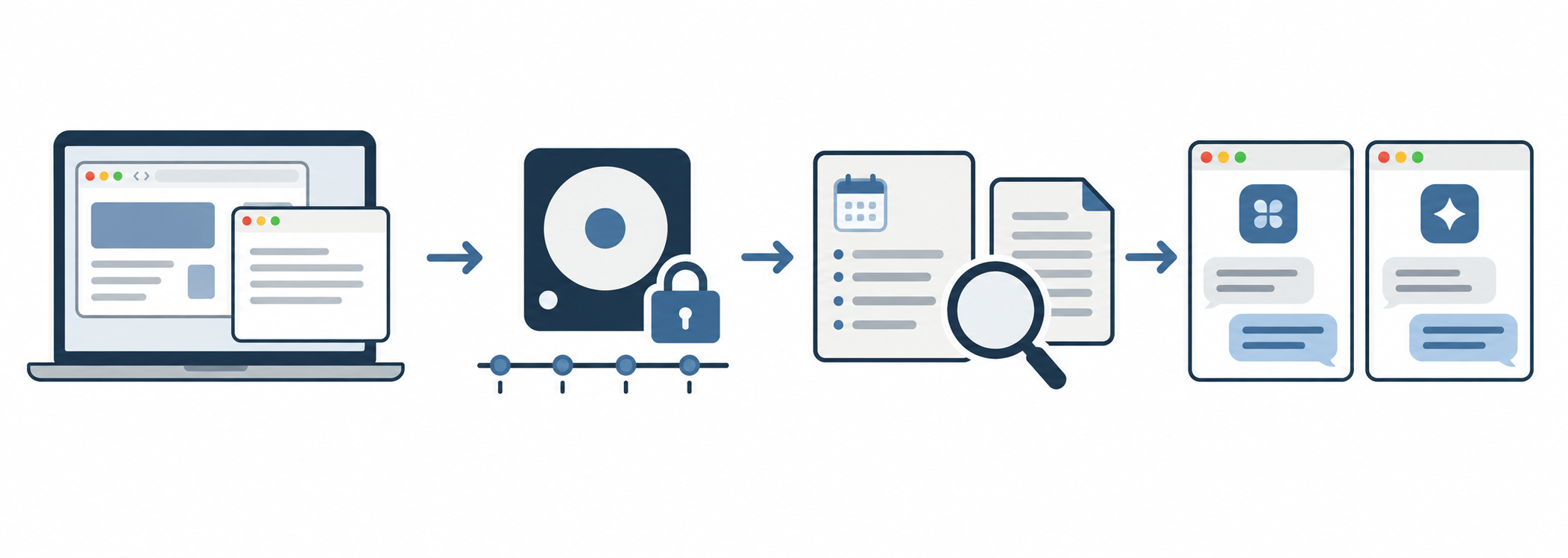
- 01활성 창의 내용 읽기
- 02Mac에 기록 보관
- 03기록과 요약 검색
- 04연결한 에이전트에서 찾기
예를 들어 “아까 보던 문서 찾아줘”라고 물어보면 연결한 에이전트가 Side 기록과 출처를 검색합니다. Claude Code·Codex·Cursor·Aside에 연결할 수 있습니다. 연결 방법 보기 ↗
Mac에서 내용 기록
macOS 권한을 허용하면 활성 앱과 브라우저의 텍스트를 읽습니다. 특정 앱·웹사이트를 제외하거나 언제든 기록을 일시정지할 수 있습니다.
기록 검색과 날짜별 요약
기기에 저장된 기록을 검색할 수 있습니다. 날짜별 요약을 생성하려면 요약 제공자를 설정하고 활동 브리핑 전송에 동의해야 합니다.
연결한 에이전트에서 검색
MCP를 연결하면 history_search, history_read, memory_search로 기록과 요약을 검색하고 출처를 확인할 수 있습니다.
바로 물어보기
기억나는 대로 질문해 보세요.
Side에 기록이 남아 있다면 연결한 에이전트가 본 시각과 확인 가능한 출처를 찾아줍니다.
아까 본 페이지가 뭐였지?
“오늘 오전에 봤던 개인정보 안내 문서의 제목과 주소를 찾아줘.”
회의 전에 뭘 하고 있었지?
“회의 들어가기 직전에 읽던 문서와 작성하던 메모를 찾아줘.”
오늘은 무슨 일을 했지?
“오늘 오후에 한 일을 시간순으로 정리해줘.” 날짜별 요약을 켰다면 그 내용을 함께 활용할 수 있습니다.
Side 스킬
중단한 일을 출처와 함께 이어가세요.
/side-resume은 해당 시간대의 Side 기록에서 관련 출처를 최대 5개 읽고, 확인된 사실·미완료 또는 미확인 작업·다음 행동을 짧게 정리합니다. 기록만으로 완료 여부를 단정하지 않습니다.
스킬은 소스와 앱 패키지에 들어 있지만, 사용하는 에이전트에 직접 설치해야 합니다. Side MCP 연결도 별도로 필요합니다.
/side-resume 어제 오후에 검토하던 문서 작업 이어줘Claude Code와 Aside에서는 /side-resume, Codex에서는 $side-resume로 요청할 수 있습니다. Side가 기록한 범위 안에서만 답합니다.
시작하기
Mac에서 소스를 빌드해 설치하세요.
macOS 14+, Bun, Xcode Command Line Tools, FTS5와 확장 로딩을 지원하는 SQLite dylib가 필요합니다. 빌드 과정에서 MiniLM 모델을 내려받습니다.
git clone https://github.com/Chris-Chai-Minjae/side-work-memory.git
cd side-work-memory
bun install --frozen-lockfile
bun run build
ditto apps/side-mac/.build/release/Side.app /Applications/Side.app
open /Applications/Side.app
앱을 종료한 뒤 새 빌드를 복사하세요. 이 로컬 빌드는 임시 서명되며, 교체 후 macOS 권한과 Keychain 접근을 다시 허용해야 할 수 있습니다. 상세 조건은 상세 설명서 ↗를 확인하세요.
모델과 에이전트
요약 제공자와 에이전트 연결은 선택 사항입니다.
MiMo·MiniMax 같은 API 제공자의 키는 Side 설정에 입력해 macOS Keychain에 보관합니다. OpenAI는 터미널에서 codex login으로 로그인한 뒤 Side에서 OpenAI (Codex login)을 고를 수 있습니다. Claude Code도 claude auth login 후 로그인 옵션을 고릅니다. Side는 CLI 로그인 토큰 내용을 직접 읽거나 복사하지 않습니다. Codex 로그인이 Keychain에만 저장된 환경은 현재 지원하지 않습니다.
CLI 로그인을 Side 요약에 사용하는 경우 각 서비스의 약관과 사용량 제한을 직접 확인하고 본인 책임으로 사용하세요. 실제 활동 브리핑은 해당 제공자의 증거 전송을 켠 뒤에만 보냅니다. 활동이 많은 날에는 요약에 수백만 입력 토큰이 쓰일 수 있고 현재 일일 한도는 없습니다.
요약 제공자를 설정하지 않아도 기록은 할 수 있습니다. 요약 생성에는 제공자 설정과 전송 동의가 필요합니다.
Claude Code, Codex, Cursor, Aside 등에서 검색하려면 각 클라이언트에 Side의 로컬 MCP 서버를 등록해야 합니다.
claude mcp add --scope user side -- "/Applications/Side.app/Contents/Resources/side" mcpSide가 실행 중일 때 Claude Code의 사용자 범위에 등록하는 예입니다. 다른 에이전트의 등록 방법은 연결 안내 ↗를 참고하세요.
프라이버시와 동의
무엇을 남기고 언제 지울지 직접 정하세요.
Side는 원본 기록을 클라우드에 동기화하지 않습니다. 기록 보존 기간과 제외 목록을 설정하고, 기록을 일시정지하거나 삭제할 수 있습니다.
지원 브라우저의 현재 탭 주소를 읽을 때 필요한 macOS 권한입니다. 이미 허용했다면 Side에 이미 허용됨이 표시되고 새 승인 창이 뜨지 않습니다. 상태는 시스템 설정 → 개인정보 보호 및 보안 → 자동화에서 확인하세요. Apple 안내 ↗
Side에 저장한 MiMo·MiniMax 등의 API 키를 Side가 읽을 수 있는지 확인합니다. “키 참조 설정됨”은 저장됐다는 뜻이며 “접근 확인 전”은 아직 읽기 검사를 하지 않았다는 뜻입니다. 이미 허용했다면 새 승인 창 없이 확인이 끝날 수 있습니다. 기록 암호화 키도 Keychain에 별도로 보관됩니다. Codex·Claude Code CLI 로그인과는 별개입니다. Apple 안내 ↗
앱의 권한 화면에서 손쉬운 사용, 입력 모니터링, 화면 기록 상태를 각각 확인하고 해당 macOS 설정을 열 수 있습니다. 화면 기록은 글자를 읽을 수 없는 화면에 OCR을 쓰는 선택 권한입니다.
기록과 요약, 검색 색인은 모두 이 Mac에 저장됩니다. 원본 기록의 민감 정보가 담긴 컬럼은 저장 전에 마스킹 후 암호화하고, 암호화 키는 macOS Keychain에 보관합니다.
원본 보관 기간은 기본 14일이며 1·3·7·14·30일 중 고를 수 있습니다. 최근 10분, 지난 1시간, 오늘, 전체 이력을 언제든 삭제할 수 있고, 전체 삭제는 암호화 키까지 교체합니다.
Side 도구는 사용자가 직접 등록한 클라이언트에서만 호출됩니다. 비밀번호 입력 필드는 처음부터 기록하지 않습니다.
현재 상태
현재는 소스에서 직접 빌드해야 합니다.
Side는 개발 중이며, 각자의 Mac에서 소스를 빌드해 사용해야 합니다. 사전 빌드 앱의 Developer ID 서명·공증과 장시간 실기기 검증은 완료되지 않았습니다. Grok Build 로그인으로 Side 요약을 만드는 경로는 검증되지 않았으며, 요약 제공자로 연결되어 있지 않습니다. 기능별 근거와 남은 검증 항목은 저장소의 QA 보고서에서 확인할 수 있습니다.
Side Work Memory · Open source macOS app
Find the context
behind your day.
Side stores readable content from active browser and Mac app windows on your device. Search it with its sources, or create daily summaries after configuring a provider and consenting to send activity briefings. Connected agents can search that history too.
In development · macOS 14+ · source build only
Find what you read,
with the source.
A synthetic example of the path from a summary back to its source.
How it works
Capture, summarize, trace the source.
Side gathers readable context from the active window and organizes your day through a summary provider you authorize.
- 01Read active windows
- 02Store on your Mac
- 03Search records and summaries
- 04Find with a connected agent
Ask “Find the document I was just reading,” and a connected agent can search Side's records and show the source. Side works as an MCP tool in Claude Code, Codex, Cursor, and Aside. See connection steps ↗
Observe on your Mac
With your permission, Side reads text from active apps and browsers. Exclude apps or websites, or pause capture at any time.
Organize by time and topic
Search local records and configure a summary provider for daily memories. Summaries require provider setup and consent to send evidence.
Ask an agent
Connect MCP to use history_search, history_read, and memory_search and inspect the source.
Try asking
Ask in your own words.
If Side captured the activity, a connected agent can find when it happened and show a source you can check.
What was that page?
“Find the title and link of the privacy guide I read this morning.”
Where did I leave off?
“Find the document I was reading and the note I was writing right before the meeting.”
What did I do today?
“Put my work this afternoon in time order.” If you enabled daily summaries, the agent can use those too.
Side skill
Pick up where you left off, with sources.
/side-resume reads up to five relevant Side records for the requested period and gives you confirmed facts, unfinished or unverified work, and the next steps. A viewed page alone does not prove a task was finished.
The skill is included in the source and app bundle. Install it in each agent you use, and connect the Side MCP server separately.
/side-resume Pick up the document I was reviewing yesterday afternoonUse /side-resume in Claude Code or Aside, or $side-resume in Codex. Answers are limited to the activity Side actually recorded.
Get started
Build it from source.
Requires macOS 14+, Bun, Xcode Command Line Tools, and a SQLite dylib with FTS5 and extension loading. The build downloads the MiniLM model.
git clone https://github.com/Chris-Chai-Minjae/side-work-memory.git
cd side-work-memory
bun install --frozen-lockfile
bun run build
ditto apps/side-mac/.build/release/Side.app /Applications/Side.app
open /Applications/Side.app
Quit Side before copying a new build. Local builds use ad hoc signing, so macOS permissions and Keychain access may need to be granted again after replacement. See the detailed manual ↗ for details.
Models and agents
Your connections, your choice.
Enter keys for API providers such as MiMo and MiniMax in Side settings; Side stores them in macOS Keychain. For OpenAI, run codex login in Terminal, then choose OpenAI (Codex login) in Side. Claude Code has a separate claude auth login option. Side does not read or copy CLI login-token contents. A Codex login stored only in Keychain is not currently supported.
Use a CLI login for Side summaries at your own risk; check each service's terms and usage limits. Side sends real activity briefings only after you turn on Send evidence to this provider. Busy days can use millions of input tokens, and Side has no daily cap yet.
Provider setup is optional. Capture can run without one, but summaries will wait.
Register Side's local MCP server separately in Claude Code, Codex, Cursor, Aside, or another client.
claude mcp add --scope user side -- "/Applications/Side.app/Contents/Resources/side" mcpExample: register Side in Claude Code at user scope while Side is running. See agent connection instructions ↗ for other clients.
Privacy and consent
Choose what Side keeps, and for how long.
Side does not sync raw captures to the cloud. Set retention, exclusions, pause capture, or delete Side history.
Side uses this macOS permission to read the current tab URL in supported browsers. If already allowed, Side shows Already allowed and no new approval dialog is needed. Check System Settings → Privacy & Security → Automation. Apple guide ↗
Checks whether Side can read an API key you saved for MiMo, MiniMax, or another API provider. “Key reference configured” means it was registered; “Access not checked” means it has not yet been read. If access is already approved, the check can finish without a new prompt. The record-encryption key is separate. Codex and Claude Code CLI logins do not use this button. Apple guide ↗
Side's Permissions page shows Accessibility, Input Monitoring, and Screen Recording separately and opens their macOS settings panes. Screen Recording is optional for OCR when readable text is unavailable.
Records, summaries, and the search index are all stored on this Mac. Sensitive raw columns are masked and encrypted before storage, and the encryption key is kept in macOS Keychain.
Raw captures last 14 days by default; choose 1, 3, 7, 14, or 30 days. Delete the last 10 minutes, the past hour, today, or all history at any time; clearing all rotates the encryption key.
Side's tools are called only by the clients you register yourself. Password input fields are never recorded.
Development status
Open source, with gates still open.
Side is in development. Distribution currently means building from source on each user's Mac. A prebuilt app has not completed Developer ID signing and notarization, and long running device checks remain. Using a Grok Build login to create Side summaries is unverified and is not connected as a summary provider. See the repository's QA reports for evidence and open gates.